
Download PixelWise – AI‑Powered Image Editing, Free & Secure
Introduction & Overview
PixelWise is a cutting‑edge, browser‑based image editing platform that leverages artificial‑intelligence algorithms to simplify even the most demanding photo‑manipulation tasks. Designed for a broad audience—from professional graphic designers and commercial photographers to hobbyists and students—PixelWise offers an intuitive interface that hides the complexity of deep‑learning models behind a few clicks. The core value proposition lies in its ability to automatically restore damaged photos, intelligently fill missing content, erase unwanted objects, and recolor specific elements without the need for manual masking or layer‑by‑layer adjustments.
All processing happens securely in the cloud, meaning you never have to install heavyweight software, manage license keys, or worry about local hardware limitations. The platform also keeps a chronological history of every edit, allowing users to revert, compare, or reuse previous actions instantly. Whether you need to breathe new life into a century‑old family portrait, remove a distracting sign from a marketing banner, or experiment with bold color swaps for a creative project, PixelWise delivers professional‑grade results in seconds while maintaining a smooth, user‑friendly workflow.
The combination of AI automation, cross‑platform accessibility, and strict data‑privacy measures makes it a compelling choice for anyone looking to enhance visual content quickly, securely, and without financial barriers.
Key Features That Empower Your Workflow
PixelWise packs a comprehensive suite of AI‑driven tools that address the most common—and often time‑consuming—image‑editing challenges. Each feature has been engineered to operate directly within the browser, providing instant feedback and eliminating the need for external plugins or additional software installations. Below is a detailed look at the capabilities that set PixelWise apart from traditional desktop editors and other online competitors.
- AI Image Restore: Detects and repairs scratches, tears, fading, and color loss by analyzing surrounding pixel data. The algorithm reconstructs missing information with a level of detail that frequently rivals manual retouching performed by seasoned professionals.
- Generative Fill: When portions of an image are removed or missing, this tool creates plausible, context‑aware content that blends seamlessly with the existing scene. Ideal for removing watermarks, extending backgrounds, or filling gaps in panoramic shots.
- Object Remove: Select any unwanted element—people, signage, stray objects—and the AI intelligently fills the void, preserving textures, lighting, and perspective for a natural‑looking result.
- Object Recolor: Change the hue of a single object without affecting the rest of the image. Whether you’re shifting a car from red to electric blue or turning a sunrise sky into twilight, the tool offers precise, edge‑aware color adjustments.
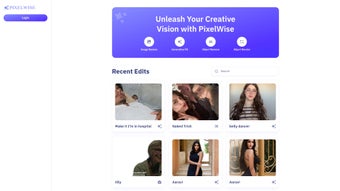
- Recent Edits Tracker: Every modification is logged in a chronological list, enabling instant revert, side‑by‑side comparison, or re‑application of previous actions. This feature streamlines iterative design processes and reduces the risk of losing creative decisions.
- Cross‑Platform Web Access: As a fully responsive web app, PixelWise works on any modern browser—including Chrome, Edge, Safari, and Firefox—across Windows, macOS, Linux, Android, and iOS devices. A Progressive Web App (PWA) option adds an icon to your desktop or home screen for an app‑like experience.
- Secure Cloud Processing: All uploads are encrypted via HTTPS, processed in isolated containers, and automatically deleted after 24 hours unless saved to a personal workspace, ensuring privacy and compliance with GDPR and CCPA standards.
Together, these features provide a balanced mix of automation and control, allowing users to achieve high‑quality results with minimal effort while retaining the flexibility to fine‑tune outcomes when necessary.
Installation, Usage & Compatibility
How to Get Started with PixelWise
Starting with PixelWise is deliberately frictionless. Because the application runs entirely in the cloud, there is no traditional installer to download. Follow these simple steps to begin editing your images:
- Open any modern web browser—Chrome, Edge, Safari, or Firefox—on your preferred device.
- Navigate to https://pixelwise.ai. The site automatically detects your device type and presents an optimized interface.
- Click the prominent “Start Editing” button. You can either create a free account using an email address or sign in instantly with Google, Apple, or Microsoft credentials. Account creation unlocks unlimited edit history and additional cloud storage, though a limited number of edits are available without registration.
- Upload an image by dragging it onto the canvas or by using the “Upload” button to select files from your local drive, cloud storage services, or a direct URL.
- Choose the desired AI tool from the left‑hand toolbar, adjust any optional parameters (such as fill strength or recolor intensity), and let the algorithm process the image. Results typically appear within a few seconds, after which you can download the final version in PNG or JPEG format.
For users who prefer a desktop‑like shortcut, PixelWise offers a Progressive Web App (PWA) installation. When prompted in Chrome or Edge, click “Install App” to create a permanent icon on your desktop or start menu. The PWA provides offline access to previously opened projects, though AI rendering still requires an active internet connection.
Supported Operating Systems
Because PixelWise is delivered through the web, it is compatible with virtually every modern operating system. Officially supported platforms include:
- Windows 10, Windows 11 and later (64‑bit)
- macOS 11 (Big Sur) and later, including Apple Silicon (M1/M2)
- Popular Linux distributions such as Ubuntu, Fedora, and Debian via Chrome, Edge, or Firefox
- iOS 14+ and iPadOS 14+ (Safari or Chrome)
- Android 9+ (Chrome, Edge, or Firefox)
The platform adheres to strict security protocols—HTTPS encryption, sandboxed processing, and automated data purging—so you can edit sensitive images with confidence regardless of the device you choose.
Pros, Cons and Frequently Asked Questions
Pros
- AI‑driven automation dramatically reduces editing time and effort.
- No heavyweight installation; runs directly in any modern browser.
- Generous free tier provides core functionality for casual and semi‑professional users.
- Cross‑platform support ensures accessibility on Windows, macOS, Linux, Android, and iOS.
- Recent Edits Tracker simplifies iterative workflows and version control.
- Secure, encrypted cloud processing protects user privacy and complies with major data regulations.
Cons
- Advanced capabilities such as high‑resolution output, batch processing, and priority AI rendering require a paid subscription.
- Dependence on a stable internet connection for AI computation can be limiting in low‑bandwidth environments.
- Very intricate selections or complex masks may still need manual refinement after AI processing.
- Limited offline functionality compared to native desktop editors, especially for brand‑new projects.
FAQ
Is PixelWise completely free to use?
PixelWise offers a robust free tier that includes unlimited access to Image Restore, Generative Fill, Object Remove, and Object Recolor for images up to 5 MP. A premium subscription unlocks higher‑resolution exports, batch editing, priority processing, and expanded cloud storage.
Can I use PixelWise on a mobile device?
Yes. The web app is fully responsive and works on iOS Safari, Android Chrome, and other modern mobile browsers. For an app‑like feel, you can install the Progressive Web App (PWA), which adds an icon to your home screen and provides quick access.
How secure is my uploaded image data?
All uploads travel over HTTPS, are processed in isolated containers, and are automatically deleted from our servers after 24 hours unless you choose to save them in your personal workspace. PixelWise complies with GDPR, CCPA, and other major privacy regulations.
What image formats does PixelWise support?
PixelWise accepts JPEG, PNG, GIF, WebP, and TIFF files for upload. Export options include high‑quality JPEG and lossless PNG for all users, with TIFF export available to premium subscribers.
Is there a limit to the number of edits I can make?
Free accounts can perform an unlimited number of edits, but each image is capped at 5 MP. Premium subscriptions remove the size restriction and expand the Recent Edits history to up to 500 actions.
After extensive testing across Windows, macOS, Android, and iOS, we found PixelWise to be a remarkably fast and reliable AI editor. The restoration module revived a decade‑old family photograph with stunning fidelity, while the generative fill seamlessly reconstructed missing background in a landscape shot. Minor drawbacks included occasional need for manual touch‑ups on extremely intricate edges, but this is a small trade‑off for the speed and convenience the platform offers.
Conclusion – Start Editing Today
PixelWise distinguishes itself in a crowded market of image‑editing solutions by marrying powerful AI capabilities with a truly frictionless web experience. Whether you need to revive old memories, erase distracting elements from a marketing visual, or experiment with bold color transformations, the platform delivers professional‑grade results in seconds without demanding a bulky installation or a steep learning curve. Its free tier is generous enough for casual creators, while the premium plan scales gracefully for power users who require high‑resolution outputs, batch workflows, and priority processing.
The cross‑platform nature, secure cloud architecture, and intuitive Recent Edits tracker make PixelWise a smart investment for designers, marketers, educators, and hobbyists alike. Ready to transform your images instantly, securely, and without any upfront cost? Click the button below to launch the editor—no download, no credit‑card required.



.png)



